KitchenAid Mixer Not Working? 5 Parts You Should Check First
Is your KitchenAid mixer suddenly refusing to start, spin, or mix? When a dependable kitchen workhorse stops mid-task, it can disrupt your entire workflow and slow down productivity. The good news is that most issues are caused by a few common, replaceable parts—making repairs simpler and more cost-effective than you might expect, especially when sourcing reliable KitchenAid mixer parts in Canada.
Instead of assuming a major failure, problems are often linked to small components like brushes, gears, or the control board. By recognizing early warning signs and checking key parts step by step, you can quickly restore your mixer’s performance.
This blog explains the most common causes, essential parts to inspect, and practical troubleshooting steps to get your mixer back up and running efficiently.
Signs Your KitchenAid Mixer Parts Need Repair or Replacement
Understanding early warning signs can help you avoid sudden breakdowns and costly repairs. Most issues develop gradually, showing clear symptoms before complete failure. Identifying these signs early makes troubleshooting easier and keeps your mixer running efficiently.
The table below highlights common symptoms, likely causes, and quick repair or replacement actions:
|
Symptom |
Potential Failing Part |
Repair |
Replacement |
|
Strange Noises |
Worm gear / Gear housing |
Regrease gears and inspect for wear or debris |
Replace worn or stripped worm gears. |
|
Inconsistent Speeds |
Motor brushes / Speed control board |
Clean contacts and check brush alignment |
Replace worn brushes or a faulty control board |
|
Oil Leaks |
Planetary seal / Internal grease |
Clean excess grease and inspect the seal condition |
Renew the seal and regrease with food-grade lubricant |
|
Excessive Heat |
Internal gears / Motor components |
Reduce load, allow cooling, and inspect gear movement |
Replace worn gears or damaged motor components |
|
No Power |
Power cord / Thermal fuse |
Check the outlet, reset the breaker, and inspect the cord connections |
Change the damaged cord or the blown thermal fuse |
By using this structured approach, you can quickly connect symptoms to their root causes and take the right action, whether it’s a simple maintenance fix or a part replacement. Staying proactive with these checks not only reduces repair costs but also ensures your mixer continues to perform reliably in a demanding kitchen environment.
Looking for high-quality commercial kitchen equipment parts to get your equipment back in action? Shop now at PartsFe CA for genuine, durable replacement parts, from motor brushes and control boards to gears and power cords. Get fast shipping, trusted performance, and the right parts you need to keep your kitchen running smoothly.
5 Key KitchenAid Commercial Mixer Parts to Check When It Stops Working
When your mixer suddenly stops working, identifying the root cause quickly is essential. Most issues come from a few key components—such as brushes, gears, and control boards. By understanding the symptoms and checking parts step by step, you can determine whether it’s a simple fix or a more complex internal repair.
Here’s a simplified diagnostic table to help you identify the most likely problem areas:
|
Symptoms Described |
Frequency (%) |
Primary Suspect (Part) |
Probability |
|
Mixer not turning on/intermittent power |
~5% |
Power cord and plug |
Easy |
|
The mixer is not starting, has a burning smell, and is sparking |
~10% |
Motor brushes |
Easy–Medium |
|
Works inconsistently/shuts off randomly |
~15% |
Speed control board |
Medium |
|
The motor runs, but the attachments don’t spin |
~50% |
Worm gear |
Medium |
|
Grinding noise/grease leakage/clunking |
~20% |
Gear housing assembly |
Medium–High |
This table provides a quick overview of common symptoms, likely causes, and repair difficulty, making troubleshooting more efficient. By following this approach, you can easily identify the issue and decide whether it’s a simple DIY fix or needs professional repair.
How to Troubleshoot KitchenAid Commercial Mixer Issues
If your mixer stops in the middle of a job, a quick, methodical check can often reveal the problem before you call a technician. Always unplug the unit before inspecting any internal components to ensure safety during KitchenAid mixer repair.
-
Check the Power Source: Start simple. Test the outlet with another appliance to rule out a tripped breaker. Then inspect the KitchenAid mixer power cord for fraying, cuts, or bent plug prongs that could interrupt power flow.
-
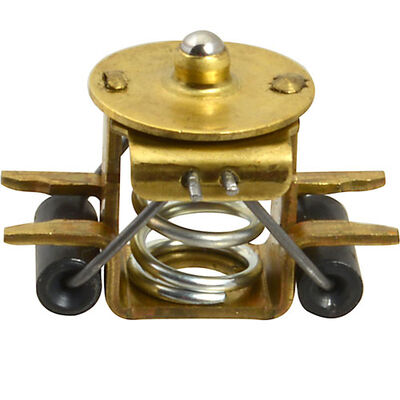
Test the Motor Brushes: Remove the side caps on the motor housing and check the KitchenAid mixer motor brushes. If they’re worn below 1/4 inch, they won’t make proper contact, preventing the motor from running.
-
Listen to the Motor: Turn the mixer on briefly. A humming sound with no movement usually indicates a stripped KitchenAid mixer gear. No sound at all often points to an electrical issue, such as a faulty KitchenAid mixer control board.
-
Check for Overheating: If the mixer stops under a heavy load, it may have triggered its thermal protection. Let it cool for about 30 minutes before restarting.
-
Observe Speed Consistency: Run through all speed settings. If the mixer only works at certain speeds or behaves inconsistently, the speed control plate may need adjustment or replacement.
Following these steps helps you narrow down the issue quickly and decide on the next course of action with confidence.
Watch the video below to fix a KitchenAid commercial mixer, covering simple troubleshooting steps and repair tips to restore proper performance.
Preventive Maintenance Tips for Commercial KitchenAid Mixers
Regular maintenance is the key to keeping your mixer reliable and avoiding costly downtime during busy service hours. Since commercial mixers handle dense doughs and continuous use, they demand more consistent care than standard residential models, especially when working with frequently replaced mixer parts.
Follow these practical tips to keep your mixer running at peak performance:
-
Listen for Changes: Encourage staff to report any new clicking, grinding, or whining sounds. Catching KitchenAid mixer gear problems early can prevent serious internal damage.
-
Keep it Cool: Avoid prolonged high-speed operation with heavy loads. If the mixer feels overly hot, pause for 15 minutes to protect the KitchenAid mixer motor and prevent thermal overload.
-
Check the Brushes Annually: Inspect KitchenAid mixer motor brushes at least once a year. Replacing them before they wear out helps prevent electrical arcing and protects the motor.
-
Regrease Periodically: Over time, internal grease can break down or harden. Plan a regreasing every 2–3 years to maintain smooth gear operation and reduce wear.
-
Secure the Planetary: Check for any wobble or looseness in the planetary and the drip cup. Tightening components early helps avoid alignment issues and internal strain.
A little preventive care goes a long way in extending the life of your mixer and ensuring consistent performance in a demanding kitchen environment.
Final Thoughts on Fixing a KitchenAid Mixer That Won’t Work
A faulty mixer doesn’t have to halt your kitchen operations or lead to expensive replacements. Most issues—like worn KitchenAid mixer motor brushes or a damaged worm gear—are designed to be serviceable and protect the motor from major failure. By spotting early warning signs and following a structured troubleshooting approach, you can fix problems efficiently and extend your mixer’s lifespan with proper maintenance and quality KitchenAid mixer parts replacement.
Key Takeaways
-
Most mixer failures are typically linked to a small number of replaceable components, making repairs more practical than full replacement.
-
Detecting early warning signs like noise or speed issues helps prevent serious motor or internal gear damage.
-
Always begin troubleshooting by checking the power source, cord, and plug before inspecting internal parts.
-
Consistent preventive maintenance, such as cleaning and inspections, greatly extends the overall lifespan of the mixer.
-
Overheating can often be avoided by not overloading the mixer and allowing cooling breaks during heavy use.
-
Using high-quality, compatible replacement parts ensures better performance, safety, and long-term durability.
FAQs
Why did my KitchenAid mixer suddenly stop working?
Sudden failure is commonly caused by overheating, which activates the thermal overload protector. It can also result from worn motor brushes, a blown thermal fuse, or loose electrical connections.
How do I reset my KitchenAid mixer?
Turn the speed control to “OFF” and unplug the mixer for 10–15 seconds. If overheating is the issue, let it cool for at least 30 minutes before restarting.
Is there a fuse in a KitchenAid mixer?
Yes, many models include an internal thermal fuse that cuts power if the motor overheats. If it blows, it must be replaced, and you should also check your circuit breaker or outlet.
How to reset the KitchenAid control board?
There’s no reset button, but you can recalibrate it by adjusting the speed control plate screws. If the board is unresponsive or damaged, replacement is usually required.
|
Disclaimer: This content is for informational purposes only and is intended to guide basic troubleshooting and maintenance. |